You are not alone if you’ve ever gone through a Dynamics 365 implementation and found that half of your financial transactions are gone, duplicated, or in a format where they can’t be used. The migration pattern you select is not a technical no-brainer in a project plan. It’s the architectural choice that you make early in the project that will affect how risky you are in go-live, how many resources you will commit, and if your finance team believes the new system on day one.
Most Australian businesses make this decision with a clear idea of what they want to do with Dynamics 365 Finance, and also an unclear idea of how they intend to get their data there. The data migration is handed over to the IT team with a small budget, and assumed that it’s exporting from the old system and importing into the new one. That mindset is to blame for more ERP project failures than any software ever has been.
Choosing the Right Data Migration Pattern in Dynamics 365 Finance
There are three basic data migration patterns in Dynamics 365 Finance environments. They all have their own trade-off between speed, risk, cost, and disruption to operations. Here’s how they actually compare, not in theory, but in practice.
1. Big Bang Pattern: Single Cutover, No room for mistakes
The idea of the Big Bang pattern is to move all data in one time-boxed cutover event, usually over a weekend or during a scheduled blackout. The legacy system remains static, data is extracted, transformed, and loaded into Dynamics 365, and the business is live on a Monday morning.
It is okay to use when:
The data is relatively clean, the organisation is one legal entity, and the budget is tight for the go-live. Where you are converting opening balances from a legacy system (MYOB or Xero) and not full transaction data, Big Bang can be the most pragmatic solution.
It fails badly when:
If data volume is underestimated, then the transformation logic fails at 2 AM, and the rollback is simply not possible, as the legacy system has been decommissioned. It has the most potential for risk out of the three, and it happens a lot more than vendors think.
Big Bang puts a tremendous amount of pressure on your mock cutover rehearsals. Without at least two complete successful test migrations (not just imports, but correct financial outputs as well), you’re not testing your migration. You are playing with your go-live date.
2. Phased Pattern: Segmented by Module, Legal Entity, and Geography
Phased migration involves deploying the D365 Finance module one by one or legal entities and geographical regions one by one. Phase one may include the General Ledger and Accounts Payable. Phase two is for Accounts Receivable and Fixed Assets. Phase three handles subsidiaries in other states or countries.
It will work:
For large Australian enterprises that have numerous legal entities, many inter-company transactions, or businesses that are moving away from a myriad of legacy systems acquired through mergers and acquisitions. Lessons learned in one phase are utilized in the next.
The one thing that nobody tells you is the sequencing issue:
Suppose that if legal entity A opens its business on March 1 and entity B opens its business on June 1, then you have three months of inter-entity transactions running at the same time in two separate systems. Putting those transactions into a state of reconciliation at entity B’s cutover is one of the most technically challenging issues in a data migration in Dynamics 365, and it needs a design that is done in advance, not a fix at the end.
Cost reality check:
Phased migrations will come at a higher total cost than Big Bang (extended project timelines, dual-system operating costs, and extra testing cycles per wave). The risk is spread around. That trade-off is a conscious one for a business whose failure to go live has a financial or regulatory impact.
3. Parallel Run Pattern: Dual-System Operation, Lowest Risk, Highest Resource Cost
During a parallel run, both the legacy system and D365 Finance run concurrently for a specific time, usually 1-3 months. Both systems process transactions, outputs from both systems are compared, and discrepancies are researched before the decommission of the legacy system.
It will work where:
No compliance repercussions are at stake, as in some industries. Also suitable when moving from a highly customized legacy system in which limited confidence exists in the transformation logic.
What you won’t learn from most articles about dynamic data migration?
Budgets can be squeezed, and a parallel run is often promised and forgotten. Having two systems running at the same time is a huge time commitment in the bookkeeping department for your finance team, as every transaction needs to be processed twice. This is an approach that will fall apart and appear as a “Big Bang” if executive leadership has not truly committed to the cost of the additional resource up front at the project’s inception.
Here is a Quick Comparison Table for You
Data Migration Pattern | Best For | Go-live Risk | Downtime Required | Total Cost | Data complexity tolerance |
Big Bang | SMBs | High | Maximum | Low | Low |
Phased | Multi-entity enterprises, | Medium | Partial | Medium | Medium |
Parallel Run | Regulated industries | Low | Minimum | High | High |
The option that seems safest on paper isn’t always the best one. It is the one that your company has the resources, risk tolerance, and data quality to carry out effectively.
D365 Data Management Framework (DMF): Core Architecture
Before choosing a Dynamics 365 data migration tool, it’s crucial to understand what is already available in the platform and what isn’t.
The Data Management Framework (DMF) is the data migration framework that is native to Microsoft’s Dynamics 365 implementation. It can be accessed directly from the D365 Finance workspace and is the main way to import and export structured data. It’s a must for anyone responsible for a Migration project to have a solid grasp of its three fundamental architectural elements.
Staging Tables
Staging tables are temporary containers, a safety zone between your source data and the D365 target entities. Data is not directly imported into the application tables, but rather is first imported into a staging table from which it is then moved to the application tables using DMF.
This is because of a critical reason for separating the transformation and validation from the actual write to the database. Check staging data, catch mapping problems, and reprovision without negatively impacting the live environment. Those teams that avoid staging are trying to do it all in one go for speed, hence creating support issues for months.
Most D365 data migration errors also occur in staging tables. It’s a gift when there is a validation error in staging. A crisis is the same error found after the target insertion.
Data Entities
The normalised abstraction layer between the DMF interface and the physical SQL tables in D365 Finance is called data entities. Business objects represented in the database are logical objects, such as a Customer, a Vendor, or a General Journal, without requiring knowledge of the underlying database schema, which consists of many hundreds of interrelated tables.
This is important for Microsoft Dynamics data migration projects, as not all entities are created equal. Some support only import. Some can be used to import and export. Some have dependencies; a Customer master entity must exist before you can import a Customer transaction entity. One of the most critical design decisions you will make as part of your import process design is to map your import sequence to entity dependencies, and one that is often overlooked.
Data Packages
Each data package is a compressed ZIP file with your data files (Excel, CSV, or XML format) and a PackageManifest.xml file, which assigns a data file to an entity and specifies sequencing. Packages let you package together a group of entities that are logically related (such as all of the vendor master data entities, for instance) and deploy them as one unit, across environments with version control.
When teams are dealing with dynamic data migrations across different environments, packages are similar to deployment artefacts. These should be version-controlled, documented, and environment-specific configurations should be separated from the package.
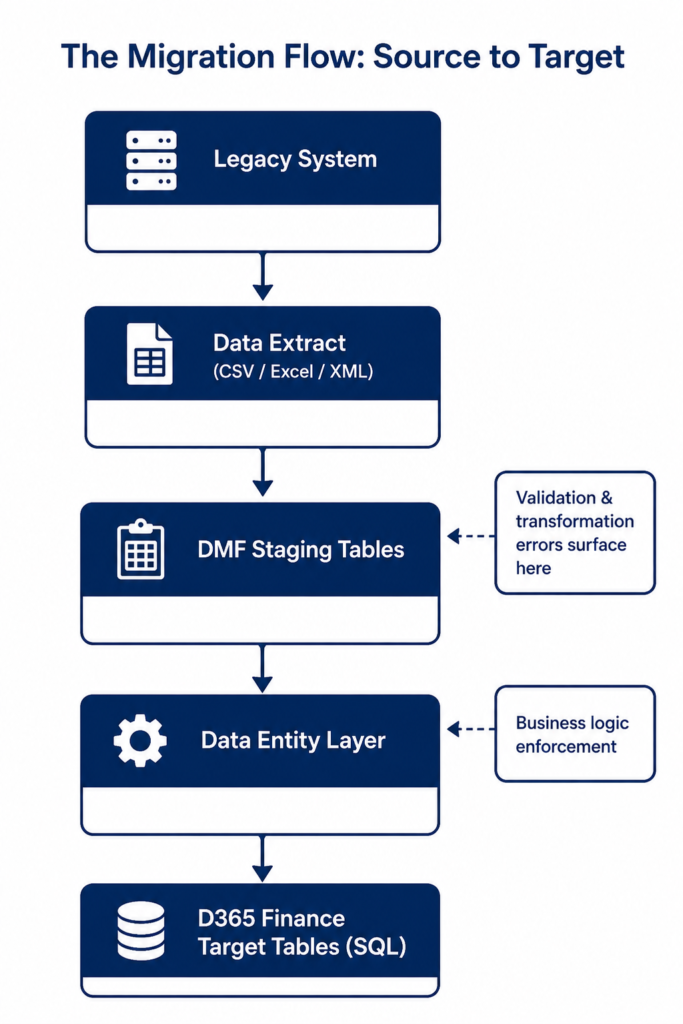
Data Migration Process Flow
The Step-by-Step Data Migration Process Flow is provided below to help you understand the process. Let’s take a look at how a data migration to D365 would operate, and where most projects go rogue, and adjust what is being done.
1. Extract & Cleanse
Export legacy data to staging files by entity. If loading, perform a full audit before loading; deleting duplicates, fixing any nulls in required fields, normalising date or format anomalies, and converting free text to system codes. Remove inactive and outdated data. Most importantly, business owners, and not IT, need to approve the data that has been cleaned. This is done to establish accountability and avoid post-go-live conflicts.
2. Map Schema
For Legacy Field Mapping, use DMF templates. Document transformation rules, default values, and gap mapping rules where there is no direct mapping should be clearly documented. This is not a single shot; it will serve as your basis of reference for later investigation of differences.
3. Load Staging
Import data into DMF staging tables and ensure to carefully examine error logs on a record-by-record basis. Fix problems in source files, and reimport clean data. Do not make manual changes in staging tables, as they make it harder to maintain traceability and make it difficult to reconcile documentation with the actual data.
4. Validate & Push
Perform validation to ensure fields are required, referential integrity, and financial dependencies. If valid, proceed to the target. Reconcile record count/totals and sample data post-load. True validation is not only loading data without error, but also ensuring that business output (e.g., reports, balances) is correct.
Data Entity Import Sequence Strategy
One of the more frequently occurring issues with failed imports in Dynamics 365 data migration projects is sequence errors, and they can be completely prevented. The D365 Finance integration requires referential integrity; the transaction cannot be imported if the vendor does not already exist. The import sequence must be exactly the same as this dependency chain.
1. Parameters & Global Data
Set up basics first: legal entities, currencies, fiscal calendars, chart of accounts, financial dimensions, and number sequences. This layer needs to be fully validated because all downstream data relies on this layer.
2. Master Data
Install master records in order of dependency: Vendors, Customers, Products, Inventory Setups, Fixed Assets. Be mindful of following up on the sequences (e.g., vendor groups followed by vendor records) to prevent rework and errors.
3. Open Balances
Only import GL balances, AP/AR invoices, fixed assets, and inventory quantities when master data is complete. Always compare to old reports. If there are no exact matches with the figures, STOP and repair before continuing.
Learning Effective Optimization Strategies for Large Data Volumes
If you are migrating millions of rows, whether it’s a multi-year transaction history, a large product catalog, or a high volume of customers, then there will be bottlenecks when you use the default DMF configuration. These are the levers that are important for large scale microsoft dynamics data migration projects.
Enable parallel processing
Set up DMF to perform multi-thread imports for large data sets to run in parallel rather than sequentially. Spend capacity based on the environment capacity; do not overclock a low-capacity environment, or you will slow it down.
Use set-based operations
Implement set-based processing to process data in bulk instead of row by row, where supported. This can save hours and days in high-volume migrations and make a big difference when dealing with large data sets.
Minimize batch timing and system load.
Import large amounts of data during off-hours to prevent conflicts with users. Add to this appropriate indexing and, if applicable, temporarily disable change tracking to lessen the write-overhead for bulk operations.
Conclusion
The key to making migrations to Dynamics 365 Finance a success is to make sound decisions early in the project. Early definition of migration patterns, sequencing, validation, and privacy controls will prevent these costs from arising later.
The structure and tools are already in place; what fails is the assumption that migration is a job rather than a structured discipline. An ideal system is a burden without the correct data, the missing data, or inconsistencies within data sets, and without the data being well-mapped. Plan before implementation, simulate cutovers, and test products (not data loads) in the real business environment. Delegate clear ownership for each data domain, and make migration a strategic priority, not a technical afterthought.
FAQs
DIXF is the underlying engine of the Data Management Framework (DMF), which is not deprecated. When you need to transform complex and high-volume data, Azure Data Factory is the recommended complement.
Yes, but most Australian businesses shouldn’t. The cost, time, and compliance of migrating opening balances at the cut-off date and archiving historical data within a warehouse are also cheaper, faster, and compliant with ATO record-keeping requirements.
Other standard DMF entities do not support custom fields that are added using extensions. The most recommended way is to create an extension to the existing standard entity and add the custom field, maintaining entity integrity. Or create a custom-built entity to meet the specific needs. Regardless, it’s important to recognize this requirement in the design process as it will cause delays and budget overages in UAT.
Three different types of validation should be applied: record count reconciliation, which checks that the number of rows in the record matches the number in the legacy extract; financial total reconciliation, which checks that the total of the financials in your trial balance matches the total of the financials in the legacy extract; and spot check sampling, which compares the financial total line by line. Incorporate all three validation checks into the database definition and save them as scripts before the start of the migration process; do not create the checks “on the fly” after the migration is complete.
Although it has the same data model as Microsoft, AX to D365 is not an easy upgrade project; it’s a complete migration project. Follow the entity mapping guides published by Microsoft in combination with DMF. Do not migrate at the database level; this leads to unsupported configurations that cause ongoing, long-term recon and performance issues for months following go-live that are difficult to diagnose.